

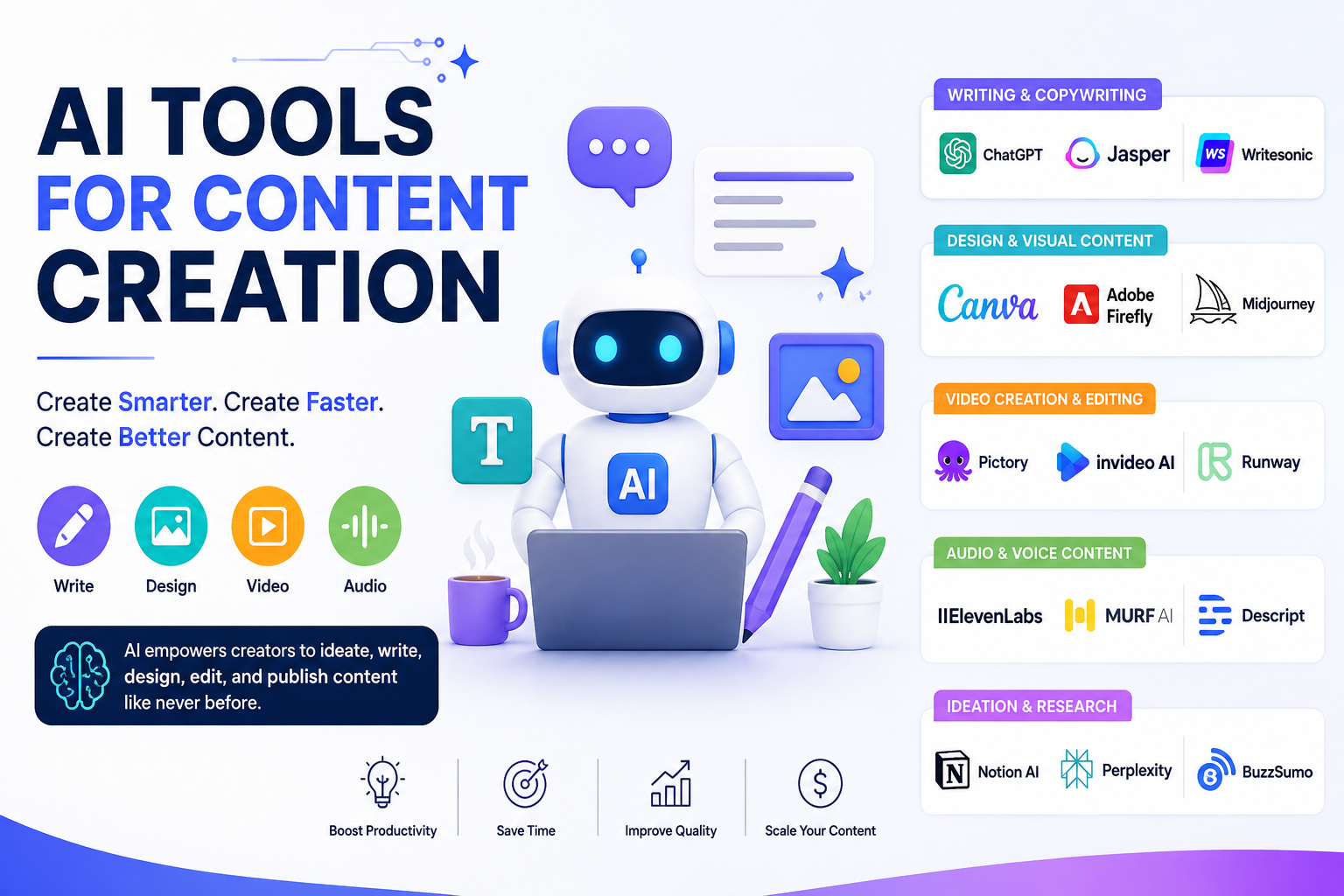
Creating high-quality content consistently takes more than writing a few paragraphs. You need to research topics, find keywords, create outlines, write drafts, design visuals, produce videos, optimize for search, and promote the finished content.
That is where AI tools for content creation can make a major difference.
The best tools can reduce repetitive work, speed up brainstorming, improve productivity, and help one person produce content across multiple channels. But AI should not replace human expertise. Fact-checking, originality, brand voice, and editorial judgment still matter.
In this guide, we’ll look at the best AI tools for content creation, what each is best at, how to use them in a practical workflow, and how to choose between free and paid options.
Best AI Tools for Content Creation at a Glance
Features, plans, and pricing can change, so check each provider before purchasing.
How We Evaluated These AI Content Creation Tools
A useful AI tool isn't necessarily the one with the most features. It needs to solve a specific content problem effectively.
The tools above can be evaluated using several practical criteria:
Content quality
Good AI content should be readable, relevant, useful, and easy to edit. The best platforms also give users enough control to adjust tone, structure, and brand voice.
Features and content formats
Some tools specialize in writing, while others focus on images, video, SEO, social media, or research. A tool's value depends heavily on the type of content you produce.
Ease of use
A powerful platform becomes less useful if it takes hours to learn. Beginners should prioritize simple interfaces, templates, and straightforward workflows.
Free and paid value
Many AI content creation tools offer free plans or trials. These can be useful for testing a platform before upgrading, although free versions often have usage limits or restricted features.
Human editing requirements
AI output should be treated as a starting point. Important facts, statistics, claims, and recommendations should be reviewed before publication.
15 Best AI Tools for Content Creation
1. ChatGPT — Best All-Purpose AI Content Tool
ChatGPT is one of the most flexible options for content creators. It can help with brainstorming, outlines, article drafts, headlines, social posts, email copy, content repurposing, and editing.
Its biggest advantage is versatility. Instead of using it for only one task, you can incorporate it throughout your content workflow.
Best for: Bloggers, marketers, SEO professionals, freelancers, and businesses.
Practical use: Give it a target keyword and audience, then ask for search-intent-based content ideas, an outline, FAQs, and a draft.
The important step is to add your own research and experience rather than publishing the raw output.
2. Claude — Best for Long-Form Writing
Claude is useful when working with lengthy documents, detailed instructions, and long-form content.
It can help writers organize ideas, rewrite sections, summarize research, and maintain a consistent tone across large pieces of content.
Best for: Long articles, reports, brainstorming, and editorial work.
3. Jasper — Best for Marketing Content
Jasper focuses heavily on marketing and business content. It can be useful for teams producing landing pages, advertisements, campaigns, blog content, and other branded material.
Its positioning around marketing workflows makes it particularly useful for organizations that need consistent messaging across multiple channels.
Best for: Marketing teams and businesses with established brand guidelines.
4. Copy.ai — Best for Marketing Workflows
Copy.ai is designed around content and business workflows. It can help generate marketing copy, social posts, sales content, and other repetitive text-based assets.
Best for: Marketing teams that want to automate recurring content tasks.
5. Grammarly — Best for Editing AI Content
AI-generated text often needs editing. Grammarly can help identify grammar problems, awkward wording, spelling mistakes, and style issues.
It is particularly useful as a second step after generating a draft with another AI tool.
Best for: Editing, proofreading, and improving readability.
6. Canva — Best for Visual Content
Canva combines graphic design with AI-powered features, making it useful for creators who need social media graphics, presentations, thumbnails, blog visuals, and other marketing assets.
You don't need advanced graphic-design skills to create professional-looking content.
Best for: Social media managers, bloggers, marketers, and small businesses.
7. Adobe Firefly — Best for AI-Generated Visuals
Adobe Firefly provides AI-powered creative features for generating and modifying visual content.
It can be useful when you need original concepts, marketing graphics, creative variations, or visual assets for campaigns.
Best for: Designers and marketing teams already using Adobe's creative ecosystem.
8. Descript — Best for Video and Audio Editing
Descript approaches video and audio editing through a text-based workflow. This can make editing interviews, podcasts, tutorials, and social videos considerably easier.
Creators can use it to clean up recordings, edit transcripts, create clips, and prepare content for different platforms.
Best for: Podcasters, YouTubers, educators, and video marketers.
9. InVideo — Best for AI Video Creation
InVideo can turn ideas or written material into video content. It can be useful for marketers who want to transform blog posts, scripts, or concepts into videos without building everything manually.
Best for: Short-form marketing videos, explainers, and social media content.
10. Surfer — Best for SEO Content Optimization
Surfer focuses on content optimization for search engines. It can help content teams evaluate keyword usage, topical coverage, structure, and other on-page considerations.
It should support an SEO strategy rather than replace keyword research and search-intent analysis.
Best for: SEO professionals, publishers, and content marketers.
11. Semrush — Best for SEO Research and Content Strategy
Semrush provides a broader SEO and digital marketing ecosystem. Its research capabilities can help identify keywords, competitors, content opportunities, and search trends.
Best for: SEO professionals and marketing teams managing larger content strategies.
12. Perplexity — Best for AI-Assisted Research
Research is one of the most important stages of content creation. Perplexity can help users explore questions, discover sources, and understand unfamiliar topics.
However, AI research should still be verified against reliable primary or authoritative sources.
Best for: Topic research, fact discovery, and preliminary information gathering.
13. Notion AI — Best for Content Organization
Notion AI is useful when content planning, documentation, notes, and collaboration all happen in one workspace.
Teams can use it to organize briefs, meeting notes, editorial calendars, ideas, and drafts.
Best for: Content teams and businesses managing large editorial workflows.
14. Buffer AI — Best for Social Media Content
Social media requires a steady stream of ideas. AI features within social media platforms can help generate post concepts, captions, and variations that can then be edited for a specific audience.
Best for: Social media managers, creators, and small businesses.
15. Pictory — Best for Turning Written Content Into Video
Pictory is useful for creators who want to repurpose written material into video. This can help businesses extend the value of existing blog posts and articles.
Best for: Content repurposing and video marketing.
Best Free AI Tools for Content Creation
If your budget is limited, you don't necessarily need a large collection of paid subscriptions.
Several platforms provide free plans, limited credits, or free versions that can handle basic tasks.
For AI tools for content creation free options are especially useful for:
Brainstorming content ideas
Creating basic outlines
Drafting short content
Editing text
Designing simple graphics
Creating social posts
Researching topics
The main limitation is usually usage. Free plans may restrict the number of generations, advanced models, exports, storage, or premium features.
A smart approach is to start with one or two free tools and upgrade only when a specific limitation affects your workflow.
Best AI Tools by Content Type
Different content formats require different tools.
For blog writing: ChatGPT, Claude, Jasper, and Copy.ai.
For SEO: Surfer and Semrush can complement a broader SEO workflow.
For visual content: Canva and Adobe Firefly.
For video: Descript, InVideo, and Pictory.
For research: Perplexity and general-purpose AI assistants.
For social media: Buffer and general-purpose AI writing tools.
The best AI tools for content creation therefore depend on what you actually produce. A YouTube creator doesn't need the same software stack as an SEO-focused blogger.
How to Use AI Tools for Content Creation
The biggest mistake is treating AI as a one-click article generator. A better approach is to build a complete workflow.
Step 1: Find a topic
Start with audience problems, search queries, customer questions, Reddit discussions, social conversations, and keyword research.
Step 2: Research the subject
Use AI to organize information and identify questions worth answering. Verify important facts using trustworthy sources.
Step 3: Build an SEO content brief
Include:
Primary keyword
Search intent
Secondary keywords
Relevant entities
Questions
Competitor weaknesses
Unique points to cover
Step 4: Create the outline
For example:
Create an SEO-focused outline for “AI tools for content creation.” Identify the search intent, important subtopics, FAQs, practical use cases, and content gaps competitors haven't addressed.
Step 5: Create the first draft
Use AI to accelerate drafting, but add your own examples, insights, data, and experience.
Step 6: Fact-check and edit
Check statistics, product claims, dates, names, quotations, and other important information.
Then edit the writing so it sounds natural and reflects your brand voice.
Step 7: Create visual assets
Turn the article into graphics, charts, thumbnails, or social media images.
Step 8: Repurpose the content
One article can become:
Blog post → LinkedIn posts → X posts → Instagram captions → YouTube script → Short-form video → Newsletter
This is where AI can dramatically improve content productivity.
How to Choose the Right AI Content Creation Tool
Before subscribing to another platform, ask five questions:
What type of content do I create most often?
Which task takes the most time?
Does the tool solve that specific problem?
Is the free version enough to test it?
Will it fit into my existing workflow?
Avoid subscribing to ten tools that perform essentially the same task.
A smaller stack of complementary tools is usually easier to manage and more cost-effective.
How to Keep AI-Generated Content Human
AI can produce grammatically correct text that still feels generic. Human input is what adds depth.
Improve AI-assisted content by adding:
First-hand experience
Original examples
Specific recommendations
Expert opinions
Case studies
Unique data
Brand-specific insights
Personal observations
For example, instead of asking AI to write “Why SEO matters,” provide a real project scenario and ask it to explain the lessons learned.
That transforms generic content into something more useful.
AI Content Creation and SEO
AI-generated content can support an SEO strategy, but producing large quantities of generic text is not a sustainable strategy.
Strong SEO content should:
Satisfy search intent
Answer the user's actual question
Demonstrate expertise
Include useful examples
Provide accurate information
Offer original value
Be easy to read
Be reviewed by a human
AI is particularly valuable for research organization, brainstorming, outlining, editing, and repurposing. Human judgment remains essential for quality and originality.
Common AI Content Creation Mistakes
Avoid these common problems:
Publishing raw AI output
Always review and improve the final content.
Skipping fact-checking
AI can make confident mistakes. Verify important claims.
Focusing only on keywords
Keywords matter, but usefulness and search intent matter more.
Making every article sound the same
Use real examples, opinions, and brand-specific language.
Using too many tools
More subscriptions don't automatically mean better content.
Ignoring copyright and licensing
Understand how a platform handles generated assets and what usage rights apply before commercial publication.
Frequently Asked Questions
What are the best AI tools for content creation?
The best option depends on your workflow. ChatGPT and Claude are versatile for writing and ideation, while specialized platforms such as Canva, Descript, Surfer, and Semrush are better suited to specific content tasks.
What is the best free AI tool for content creation?
There isn't one universal winner. Free versions of general-purpose AI assistants are useful for brainstorming and writing, while free plans from design and editing platforms can handle basic visual and editorial tasks.
Can AI create high-quality blog content?
Yes, but high-quality content generally requires human research, fact-checking, editing, and original insights. AI is most effective when used as a writing assistant rather than an unattended publisher.
What AI tool is best for writing articles?
General-purpose AI assistants can handle outlines and drafts, while dedicated AI writing platforms may offer additional marketing and brand features. The best choice depends on your content volume and workflow.
Can AI-generated content rank on Google?
AI involvement alone does not determine whether content performs well in search. Useful, accurate, original content that satisfies the user's intent has a much better chance of earning visibility.
What is the best AI tool for social media content?
Tools designed for social workflows can help with captions, post ideas, variations, and scheduling. General-purpose AI assistants can also generate social content when given detailed audience and brand instructions.
How do I make AI content sound more human?
Add first-hand knowledge, specific examples, original opinions, useful details, and brand voice. Then edit the output manually rather than publishing the first AI-generated version.
Conclusion
The best AI tools for content creation aren't necessarily the platforms with the longest feature lists. The right choice depends on your content format, budget, audience, and workflow.
For broad content work, an all-purpose AI assistant can handle ideation, outlining, drafting, and repurposing. Specialized tools become more valuable when you need advanced SEO, visual design, video editing, social publishing, or research capabilities.
The most effective strategy is AI + human expertise. Let AI handle repetitive work and accelerate production, while people remain responsible for accuracy, originality, experience, and final editorial quality.
Start with one clear content problem, test a suitable tool, measure the results, and build your AI content creation stack from there.
Leave a Reply