

Every business relies on documents, from invoices and contracts to employee records and customer forms. However, managing these documents manually can slow operations, increase errors, and create unnecessary costs. As organizations continue to embrace digital transformation, document workflow automation has become one of the most effective ways to streamline repetitive tasks, improve compliance, and enhance productivity.
Whether you're a small business owner, an IT manager, or part of a large enterprise, understanding how document workflow automation works can help you eliminate bottlenecks and create faster, more reliable business processes. This guide explains everything you need to know, including how document workflows operate, their benefits, practical use cases, leading software solutions, and implementation best practices.
What Is Document Workflow Automation?
Document workflow automation is the process of using software to automatically manage, route, approve, store, and monitor documents throughout their lifecycle without relying on manual intervention.
Instead of employees emailing files back and forth or printing paperwork for signatures, automated workflows ensure documents move through predefined steps based on specific rules. These workflows reduce delays, minimize mistakes, and improve visibility across departments.
For example, when a new invoice is received, an automated system can extract the invoice data, verify purchase information, send it to the finance manager for approval, notify the accounting team, and archive the document once payment is completed—all without manual handling.
Businesses use document workflow automation to save time, improve accuracy, strengthen compliance, and provide employees with more time for strategic work.
How Document Workflow Automation Works
Every automated document process follows a structured sequence of actions.
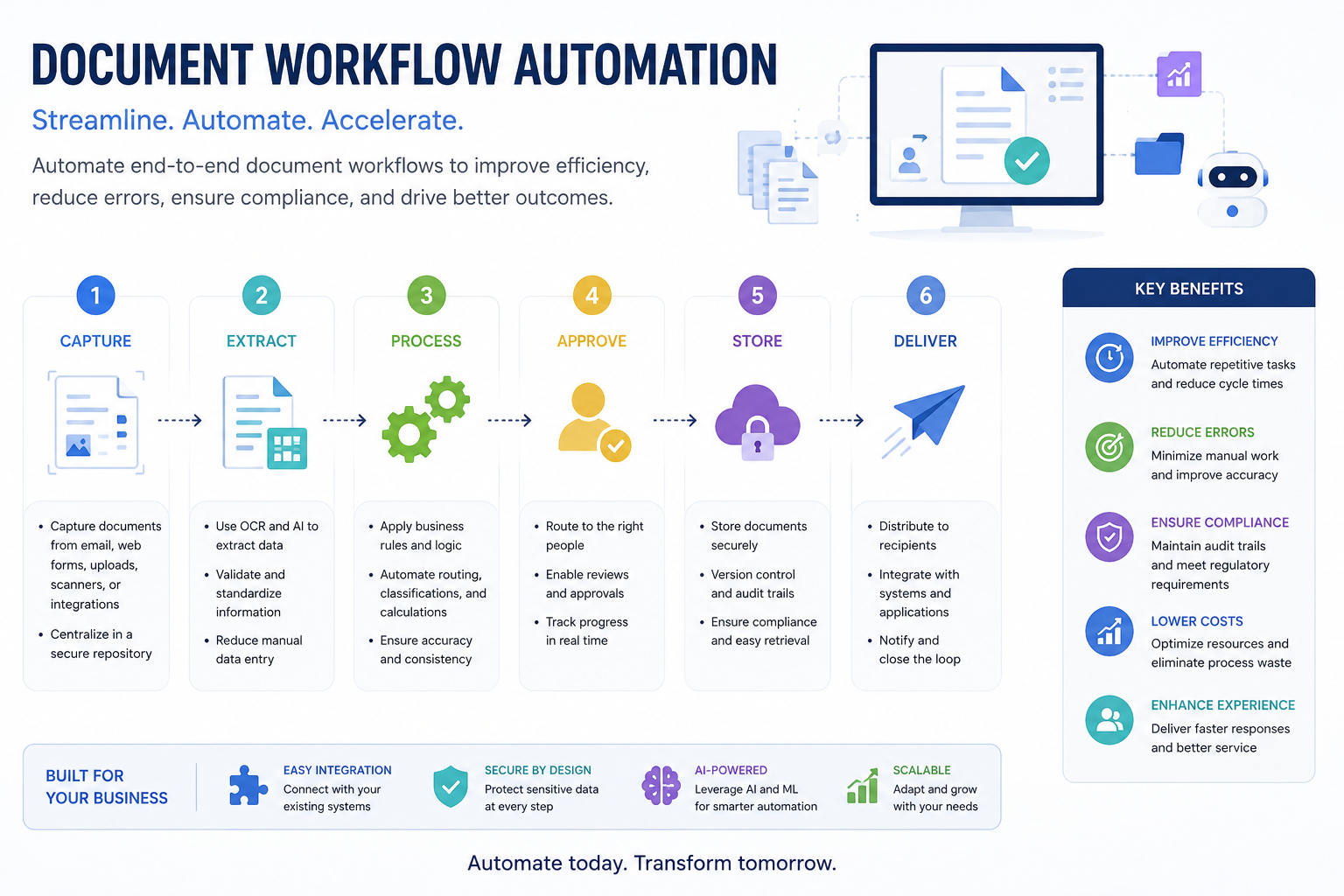
The process usually begins when a document is created, uploaded, or scanned into the system. Modern platforms often use Optical Character Recognition (OCR) to convert scanned files into searchable digital content.
Next, artificial intelligence or predefined rules extract relevant information such as names, invoice numbers, dates, or contract values. The system validates this information before routing the document to the appropriate employee or department.
Approval requests, notifications, electronic signatures, and document storage occur automatically according to configured business rules. Every action is logged, making the workflow transparent and easy to audit.
This structured approach significantly reduces processing times while ensuring consistency across the organization.
Manual vs Automated Document Workflows
Understanding the differences between manual and automated workflows highlights why businesses are investing in automation.
Automated workflows not only reduce repetitive work but also provide managers with real-time visibility into document status and pending approvals.
Key Benefits of Document Workflow Automation
Faster Document Processing
Automated workflows eliminate unnecessary delays by routing documents instantly between departments. Employees no longer need to manually forward emails or search for paperwork.
Improved Accuracy
Automation reduces typing mistakes, missing approvals, duplicate records, and inconsistent data entry by following predefined rules.
Lower Operational Costs
Businesses save money by reducing paper usage, printing expenses, manual labor, and document storage costs.
Better Compliance
Industries with strict regulations benefit from automatic audit trails, document version control, access permissions, and secure storage.
Enhanced Collaboration
Teams can review, edit, approve, and sign documents regardless of location, making remote and hybrid work more efficient.
Increased Productivity
Employees spend less time on repetitive administrative work and more time on customer service, innovation, and strategic initiatives.
Stronger Customer Experience
Faster approvals, quicker responses, and fewer processing errors contribute to improved customer satisfaction.
Types of Document Workflow Automation
Different organizations automate different document processes depending on their needs.
Invoice Processing
Invoices are automatically captured, verified, approved, and forwarded for payment without manual handling.
Contract Management
Contracts move through drafting, legal review, electronic signatures, and secure storage with complete version control.
Employee Onboarding
HR departments automate offer letters, tax forms, identification documents, policy acknowledgments, and training records.
Purchase Order Approval
Purchase requests automatically follow predefined approval hierarchies based on department budgets.
Customer Document Verification
Identity documents, application forms, and supporting files can be reviewed automatically using AI-powered document processing.
Compliance Documentation
Organizations maintain secure records, audit logs, and regulatory documentation with minimal manual effort.
What Is an Example of Workflow Automation?
One of the easiest examples of workflow automation is invoice approval.
Imagine a supplier emails an invoice to your finance department.
Instead of an employee manually downloading the file, checking purchase records, forwarding it for approval, and saving it afterward, an automated workflow completes each step.
The software receives the invoice, extracts relevant data using OCR, verifies purchase order details, routes the invoice to the finance manager, sends reminders if approval is delayed, archives the approved document, and updates accounting records automatically.
This entire process happens with minimal human involvement while maintaining complete visibility and compliance.
AI's Role in Modern Document Workflow Automation
Artificial intelligence is transforming document workflows far beyond simple automation.
AI-powered systems can classify documents, extract handwritten information, recognize tables, summarize lengthy contracts, detect anomalies, and even recommend approval decisions based on historical data.
Technologies such as Intelligent Document Processing (IDP), machine learning, and natural language processing enable organizations to automate increasingly complex business processes.
For example, insurance companies use AI to analyze claim documents, healthcare providers automate patient record processing, and legal firms summarize lengthy agreements in seconds.
Industries That Benefit Most
Nearly every industry can improve efficiency through document workflow automation.
Healthcare organizations automate patient records, insurance claims, and compliance documentation.
Financial institutions streamline loan applications, customer verification, and invoice approvals.
Legal firms automate contract reviews, document storage, and case file management.
Manufacturing companies simplify purchase orders, quality inspections, and supplier documentation.
Government agencies manage permits, licenses, and citizen applications more efficiently.
Educational institutions automate admissions, enrollment forms, transcripts, and administrative records.
What Are the Best Tools for Automating Document Workflows?
Choosing the right solution depends on your organization's size, budget, and integration requirements.
When evaluating software, consider ease of use, security, AI capabilities, scalability, integration options, reporting features, and customer support.
What Software Is Used for Document Workflow?
Many organizations combine document management systems with workflow automation platforms.
Popular software includes Microsoft Power Automate, Box, IBM Business Automation Workflow, DocuWare, Laserfiche, M-Files, Nintex, Kissflow, and PandaDoc.
These solutions integrate with cloud storage, CRM systems, ERP software, accounting platforms, and collaboration tools to create seamless business workflows.
The ideal software depends on your organization's document volume, compliance requirements, and existing technology stack.
How to Implement Document Workflow Automation Successfully
Successful implementation begins with understanding your current processes.
Map each workflow to identify repetitive tasks, approval delays, and bottlenecks. Standardize document templates before introducing automation.
Choose software that integrates with your existing systems and supports future growth. Configure approval rules, user permissions, notifications, and audit logs carefully.
Test workflows thoroughly before deployment. Employee training is equally important because successful automation depends on user adoption.
Finally, monitor workflow performance regularly using key performance indicators such as processing time, approval speed, document accuracy, and operational costs.
Common Challenges and How to Overcome Them
Organizations often face resistance when introducing automation.
Employees may worry about changing familiar processes. Providing training and demonstrating time-saving benefits can improve adoption.
Legacy software may not integrate easily with modern automation tools. Choosing platforms with strong integration capabilities reduces this challenge.
Data migration can also create difficulties. Cleaning and organizing existing documents before implementation ensures smoother transitions.
Security concerns should be addressed through encryption, access controls, audit trails, and compliance certifications.
Best Practices for Document Workflow Automation
Keep workflows as simple as possible instead of automating unnecessary complexity.
Use standardized document templates and consistent naming conventions.
Define approval responsibilities clearly to avoid confusion.
Regularly review workflow performance and optimize processes based on real business needs.
Implement role-based access controls to protect sensitive information.
Leverage AI where it adds genuine value, particularly for document classification, extraction, and intelligent routing.
Finally, maintain detailed audit logs to support compliance and governance.
Future Trends in Document Workflow Automation
Automation technology continues to evolve rapidly.
Artificial intelligence will increasingly make intelligent routing decisions without manual configuration.
Hyperautomation will combine AI, robotic process automation, analytics, and low-code platforms into unified business systems.
Voice commands, predictive workflows, digital assistants, and autonomous document processing will become more common across industries.
Organizations investing in modern workflow automation today will be better positioned to adapt to these future innovations.
Conclusion
Document workflow automation has evolved from a productivity tool into a strategic business necessity. By replacing manual document handling with intelligent automation, organizations can reduce operational costs, improve compliance, accelerate approvals, and deliver better customer experiences.
Whether you're automating invoices, contracts, employee onboarding, or customer applications, choosing the right software and implementing well-designed workflows can transform everyday operations. Businesses that invest in document workflow automation today are building more efficient, scalable, and resilient processes for the future.
Frequently Asked Questions
What is document workflow automation?
Document workflow automation uses software to automatically manage, route, approve, process, and store documents according to predefined business rules, reducing manual effort and improving efficiency.
What are the best tools for automating document workflows?
Popular tools include Microsoft Power Automate, Box, IBM Business Automation Workflow, DocuWare, Laserfiche, Nintex, Kissflow, PandaDoc, and Zapier.
What software is used for document workflow?
Businesses commonly use workflow automation platforms combined with document management systems, including Microsoft Power Automate, Box, IBM Business Automation Workflow, DocuWare, and M-Files.
What is an example of workflow automation?
A common example is invoice processing, where invoices are automatically captured, verified, approved, archived, and recorded in accounting software without manual intervention.
Is document workflow automation suitable for small businesses?
Yes. Many affordable cloud-based automation platforms are designed specifically for small and medium-sized businesses, allowing them to improve efficiency without large IT investments.
How does AI improve document workflow automation?
AI can classify documents, extract important information, summarize contracts, detect errors, recommend routing decisions, and automate repetitive document-processing tasks with greater accuracy.
Can document workflow automation improve compliance?
Yes. Automated workflows create audit trails, maintain document versions, enforce approval policies, and secure sensitive information, making regulatory compliance much easier.
Leave a Reply