

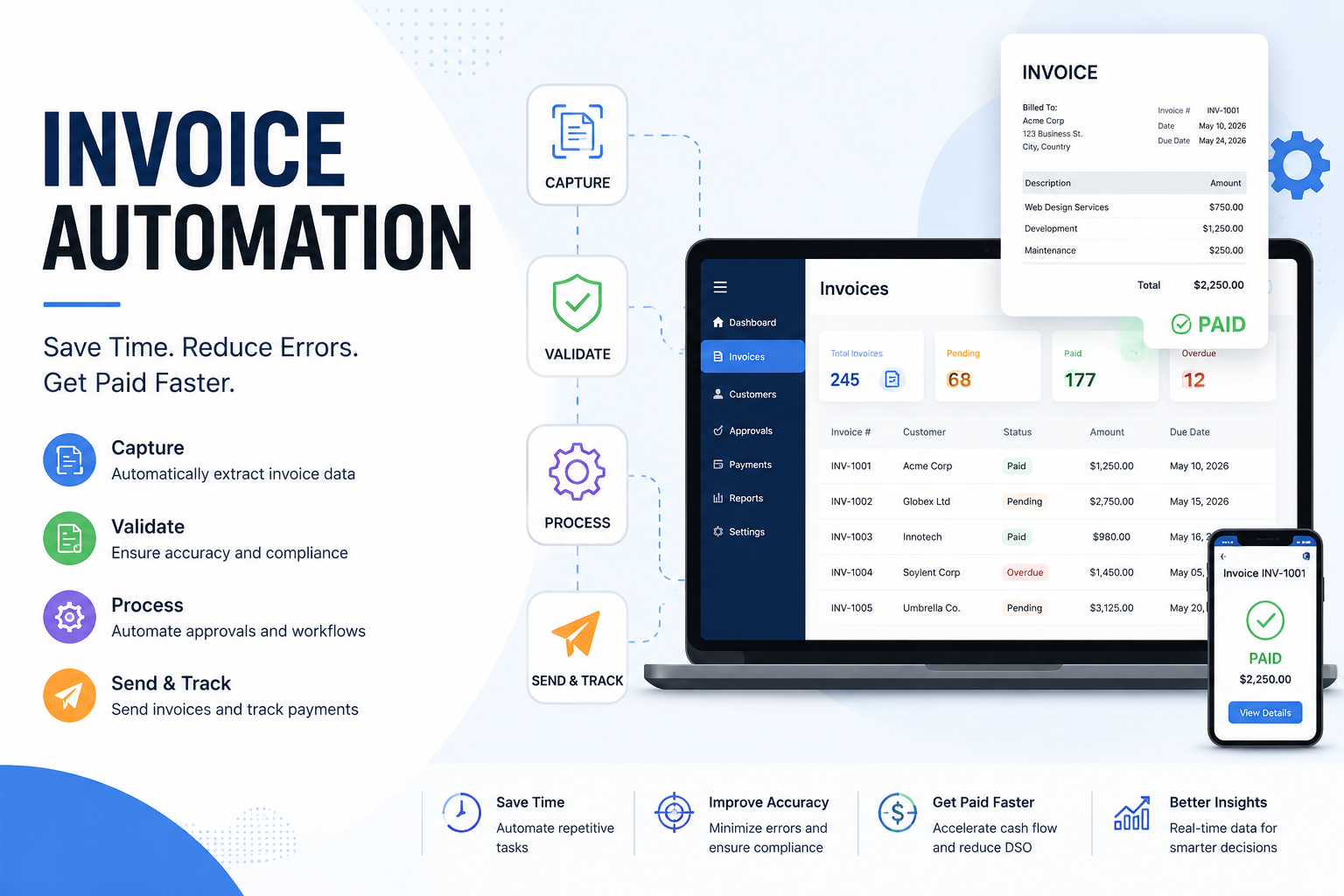
Managing invoices manually may have worked in the past, but today's fast-paced business environment demands greater speed, accuracy, and efficiency. Companies process hundreds or even thousands of invoices every month, and relying on spreadsheets, email threads, and paper documents often leads to delayed approvals, duplicate payments, costly errors, and compliance issues.
This is where invoice automation transforms the accounts payable (AP) process. By combining technologies such as Artificial Intelligence (AI), Optical Character Recognition (OCR), Intelligent Document Processing (IDP), and workflow automation, businesses can automatically capture invoice data, validate information, route approvals, and process payments with minimal human intervention.
Whether you're a small business owner, finance manager, or enterprise decision-maker, adopting invoice automation can reduce operational costs, improve cash flow visibility, strengthen vendor relationships, and free your finance team to focus on strategic work rather than repetitive administrative tasks.
In this guide, you'll learn how invoice automation works, its benefits, the technologies behind it, how AI is reshaping invoice processing, and how to choose the best solution for your organization.
What Is Invoice Automation?
Invoice automation is the use of software and intelligent technologies to digitize, capture, validate, approve, and process invoices without relying on manual data entry.
Instead of employees opening emails, typing invoice details into accounting software, chasing approvals, and manually matching purchase orders, an automated system performs these tasks quickly and accurately.
Simply put, invoice automation streamlines the entire accounts payable lifecycle—from invoice receipt to final payment.
Invoice Meaning
An invoice is a commercial document issued by a seller to request payment from a buyer for goods or services provided. It typically includes:
Invoice number
Vendor information
Customer details
Purchase order reference
Product or service descriptions
Quantity and pricing
Taxes
Payment terms
Due date
Understanding the invoice meaning is essential because automation systems rely on these data fields to accurately process payments and maintain financial records.
Invoice Automation vs. Invoice Digitization
Many businesses confuse digitization with automation, but they are different concepts.
Digitization creates digital copies, while automation manages the entire workflow from receipt to payment.
Why Businesses Are Moving Away from Manual Invoice Processing
Manual invoice processing often creates hidden costs that grow as a business scales.
Some of the most common challenges include:
Human Errors
Entering invoice details manually increases the risk of incorrect amounts, duplicate records, and payment mistakes.
Slow Approval Cycles
Invoices frequently wait in email inboxes or on managers' desks, delaying payments and impacting supplier relationships.
Duplicate Payments
Without automated validation, organizations may accidentally pay the same invoice twice.
Poor Visibility
Finance teams struggle to determine where invoices are in the approval process, making forecasting and reporting more difficult.
Compliance Risks
Manual documentation can lead to missing audit trails, incomplete records, and regulatory compliance issues.
Higher Processing Costs
Industry studies consistently show that manually processing invoices costs significantly more than automated processing due to labor-intensive tasks and error correction.
How Invoice Automation Works
Although different platforms offer unique features, most invoice automation solutions follow a similar workflow.
Invoice Capture
Invoices arrive through various channels, including:
Email attachments
PDF files
Paper invoices
Supplier portals
Electronic Data Interchange (EDI)
The system automatically imports these documents into a centralized platform.
OCR Data Extraction
Optical Character Recognition (OCR) scans invoices and extracts important information such as:
Vendor name
Invoice number
Purchase order
Invoice date
Tax amount
Due date
Total amount
This eliminates repetitive manual typing.
AI Validation
Modern Invoice automation AI solutions go beyond OCR by validating extracted information using artificial intelligence.
AI can:
Detect duplicate invoices
Verify vendor information
Identify unusual payment requests
Flag suspicious transactions
Validate tax calculations
Recognize missing fields
The system continuously improves its accuracy by learning from historical invoice data.
Purchase Order Matching
Many organizations use three-way matching to ensure payment accuracy.
The system compares:
Purchase Order (PO)
Goods Receipt Note (GRN)
Supplier Invoice
If everything matches, the invoice proceeds automatically.
Automated Approval Workflow
Invoices are routed to the appropriate approvers based on predefined business rules.
For example:
Department managers approve purchases under $5,000.
Finance directors approve invoices between $5,000 and $20,000.
CFO approval is required for higher-value invoices.
Automatic reminders and escalations help prevent approval bottlenecks.
ERP Integration
Once approved, invoice data syncs with accounting or ERP systems such as:
SAP
Oracle
Microsoft Dynamics 365
QuickBooks
Xero
NetSuite
Zoho Books
This removes duplicate data entry while maintaining accurate financial records.
Payment Processing
After approval, the payment can be scheduled automatically through supported payment methods, including:
ACH transfers
Bank transfers
Credit cards
Virtual cards
Digital payment platforms
The completed invoice is then archived with a full audit trail.
Technologies Behind Invoice Automation
Several advanced technologies work together to create a seamless invoice processing experience.
Optical Character Recognition (OCR)
OCR converts scanned invoices into machine-readable text, extracting key invoice information in seconds.
Artificial Intelligence (AI)
AI analyzes invoice data, recognizes patterns, identifies anomalies, and improves processing accuracy over time.
Machine Learning
Machine learning enables the software to continuously improve vendor recognition and invoice classification based on previous transactions.
Robotic Process Automation (RPA)
RPA automates repetitive tasks such as:
Data entry
Invoice routing
Payment scheduling
Status updates
Notifications
Intelligent Document Processing (IDP)
IDP combines OCR, AI, and machine learning to process complex invoice formats, handwritten documents, and multilingual invoices with greater accuracy.
AI Agents: The Future of Invoice Processing
The latest generation of invoice automation platforms includes AI-powered agents that can:
Answer finance team questions
Recommend approvals
Detect unusual spending
Prioritize urgent invoices
Explain invoice discrepancies
Generate financial insights
These intelligent assistants reduce manual review while helping finance teams make informed decisions more quickly.
Manual vs. Automated Invoice Processing
The differences between traditional and automated processing become more noticeable as invoice volumes increase.
Organizations processing hundreds of invoices every month often experience significant improvements in productivity after adopting automation.
Key Benefits of Invoice Automation
Implementing invoice automation delivers measurable advantages across finance operations.
Faster Processing
Invoices that once required days can often be processed within minutes.
Reduced Costs
Automation minimizes manual labor, lowers processing expenses, and reduces costly errors.
Better Accuracy
AI-powered validation improves data quality while reducing duplicate payments.
Stronger Compliance
Automated audit trails simplify internal audits and regulatory reporting.
Improved Cash Flow
Faster approvals help businesses capture early-payment discounts while avoiding late payment penalties.
Better Vendor Relationships
Suppliers receive payments on time, strengthening long-term partnerships.
Increased Employee Productivity
Finance professionals spend less time entering data and more time analyzing business performance.
Scalability
Automation allows businesses to process increasing invoice volumes without significantly expanding their finance teams.
Best Invoice Automation Software in 2026
Choosing the right platform depends on your business size, existing accounting systems, budget, and automation goals.
Some businesses also use a bill invoice app for mobile invoice creation and payment tracking, while larger organizations typically require enterprise-grade invoice automation platforms with advanced AI capabilities.
How to Choose the Right Invoice Automation Solution
Selecting the right platform involves more than comparing features. The best solution should align with your business processes, integrate with existing systems, and support future growth.
Consider the following factors before making a decision:
AI and OCR Accuracy
Look for software that accurately extracts invoice data from PDFs, scanned documents, and digital invoices while continuously improving through machine learning.
Integration Capabilities
Choose a solution that integrates seamlessly with your ERP, accounting software, procurement tools, and banking systems.
Workflow Customization
Every business has unique approval rules. Your software should allow you to create custom workflows based on departments, invoice values, vendors, or locations.
Security and Compliance
Financial documents contain sensitive information. Prioritize platforms with encryption, role-based access control, audit logs, and compliance certifications.
Scalability
As your business grows, your invoice automation platform should handle increasing invoice volumes without compromising performance.
Reporting and Analytics
Real-time dashboards and analytics help finance teams monitor invoice status, approval times, processing costs, and cash flow.
ERP and Accounting Software Integration
Modern invoice automation platforms are designed to connect with leading accounting and ERP systems.
Some of the most common integrations include:
SAP
Oracle ERP
Microsoft Dynamics 365
NetSuite
QuickBooks
Xero
Sage
Zoho Books
These integrations automatically synchronize vendor records, purchase orders, invoices, and payment information, reducing duplicate data entry and improving financial accuracy.
Security, Compliance, and Fraud Prevention
Finance departments process confidential financial information every day, making security a top priority.
A reliable invoice automation platform should provide:
End-to-end data encryption
Role-based user permissions
Complete audit trails
Multi-factor authentication
Duplicate invoice detection
Fraud monitoring
Secure cloud storage
Compliance with industry regulations
These features help organizations reduce financial risk while simplifying internal and external audits.
Invoice Automation Implementation Roadmap
Implementing invoice automation doesn't have to be overwhelming. Following a structured plan helps ensure a smooth transition.
Step 1: Evaluate Your Current Process
Review how invoices are currently received, approved, and paid. Identify bottlenecks, delays, and repetitive manual tasks.
Step 2: Define Your Goals
Examples include:
Reduce invoice processing time
Lower processing costs
Improve approval speed
Eliminate duplicate payments
Step 3: Select the Right Software
Compare vendors based on integrations, AI capabilities, security, pricing, and customer support.
Step 4: Configure Approval Workflows
Create automated approval rules that reflect your company's financial policies.
Step 5: Integrate Existing Systems
Connect your ERP, accounting software, procurement tools, and banking platforms.
Step 6: Test the Workflow
Run a pilot project using a small number of invoices before full deployment.
Step 7: Train Employees
Provide training for finance teams, managers, and approvers to ensure successful adoption.
Step 8: Monitor Performance
Track key metrics and optimize workflows as your business grows.
Measuring ROI of Invoice Automation
The success of invoice automation should be measured using clear Key Performance Indicators (KPIs).
For example, if a company processes 20,000 invoices annually, reducing processing costs by even a few dollars per invoice can result in substantial yearly savings while improving employee productivity.
Industry Use Cases
Invoice automation benefits organizations across nearly every industry.
Manufacturing
Manufacturers often receive invoices from hundreds of suppliers. Automation speeds up purchase order matching and reduces payment delays.
Healthcare
Hospitals and healthcare providers process large numbers of invoices while maintaining strict compliance requirements. Automated workflows improve efficiency and accuracy.
Retail
Retail businesses experience seasonal fluctuations in invoice volume. Automation helps finance teams handle increased workloads without additional staffing.
Construction
Construction firms manage invoices from contractors, subcontractors, and material suppliers. Automated approval workflows improve project cost tracking.
Logistics and Transportation
Shipping companies process freight invoices from multiple vendors. AI-based validation helps identify billing discrepancies before payments are made.
SaaS and Technology
Technology companies benefit from automated processing of recurring vendor invoices, subscription costs, and software expenses.
Future Trends in Invoice Automation
Invoice automation continues to evolve as artificial intelligence becomes more advanced.
Emerging trends include:
AI Agents
AI agents will proactively review invoices, recommend approvals, detect anomalies, and answer finance-related questions using conversational interfaces.
Generative AI
Generative AI will summarize invoice histories, explain payment exceptions, and create financial reports with natural language prompts.
Predictive Analytics
Finance leaders will use predictive insights to forecast cash flow, optimize payment schedules, and identify spending patterns.
Hyperautomation
Organizations will connect invoice automation with procurement, expense management, contract management, and supplier onboarding to create fully automated finance ecosystems.
Continuous Learning OCR
OCR technology will become more accurate by continuously learning from new invoice formats, improving recognition rates over time.
Best Practices for Successful Invoice Automation
To maximize the value of your investment:
Standardize invoice submission formats.
Keep vendor information up to date.
Define clear approval rules.
Monitor KPIs regularly.
Review exceptions instead of every invoice.
Update workflows as business requirements change.
Train employees on new processes.
Conduct periodic security and compliance audits.
Conclusion
Invoice automation has become an essential solution for organizations looking to improve efficiency, reduce costs, and modernize accounts payable operations. By combining AI, OCR, machine learning, and workflow automation, businesses can eliminate repetitive manual tasks, accelerate approvals, minimize errors, and gain greater visibility into their financial processes.
Whether you're a growing small business or a global enterprise, investing in the right invoice automation solution can deliver long-term value through faster processing, stronger compliance, improved vendor relationships, and better financial decision-making. As AI-powered technologies continue to advance, invoice automation will play an even greater role in helping finance teams work smarter and focus on strategic initiatives rather than routine administrative work.
Frequently Asked Questions
1. What is invoice automation?
Invoice automation is the process of using software, AI, and OCR technology to automatically capture, validate, approve, and process invoices with minimal manual effort.
2. How does invoice automation improve accounts payable?
It reduces manual data entry, speeds up approvals, minimizes errors, prevents duplicate payments, and provides better visibility into invoice status and cash flow.
3. What is the role of AI in invoice automation?
AI extracts invoice data, validates information, detects anomalies, identifies duplicate invoices, and continuously improves processing accuracy through machine learning.
4. Can small businesses benefit from invoice automation?
Yes. Many cloud-based solutions are designed specifically for small and medium-sized businesses, helping them reduce administrative work and improve payment efficiency.
5. What is an Invoice automation PDF?
An Invoice automation PDF typically refers to a digital invoice document processed automatically using OCR and AI, or a downloadable guide explaining invoice automation workflows and best practices.
6. Which industries benefit the most from invoice automation?
Manufacturing, healthcare, retail, construction, logistics, technology, education, and financial services all benefit from faster invoice processing and improved operational efficiency.
Leave a Reply