

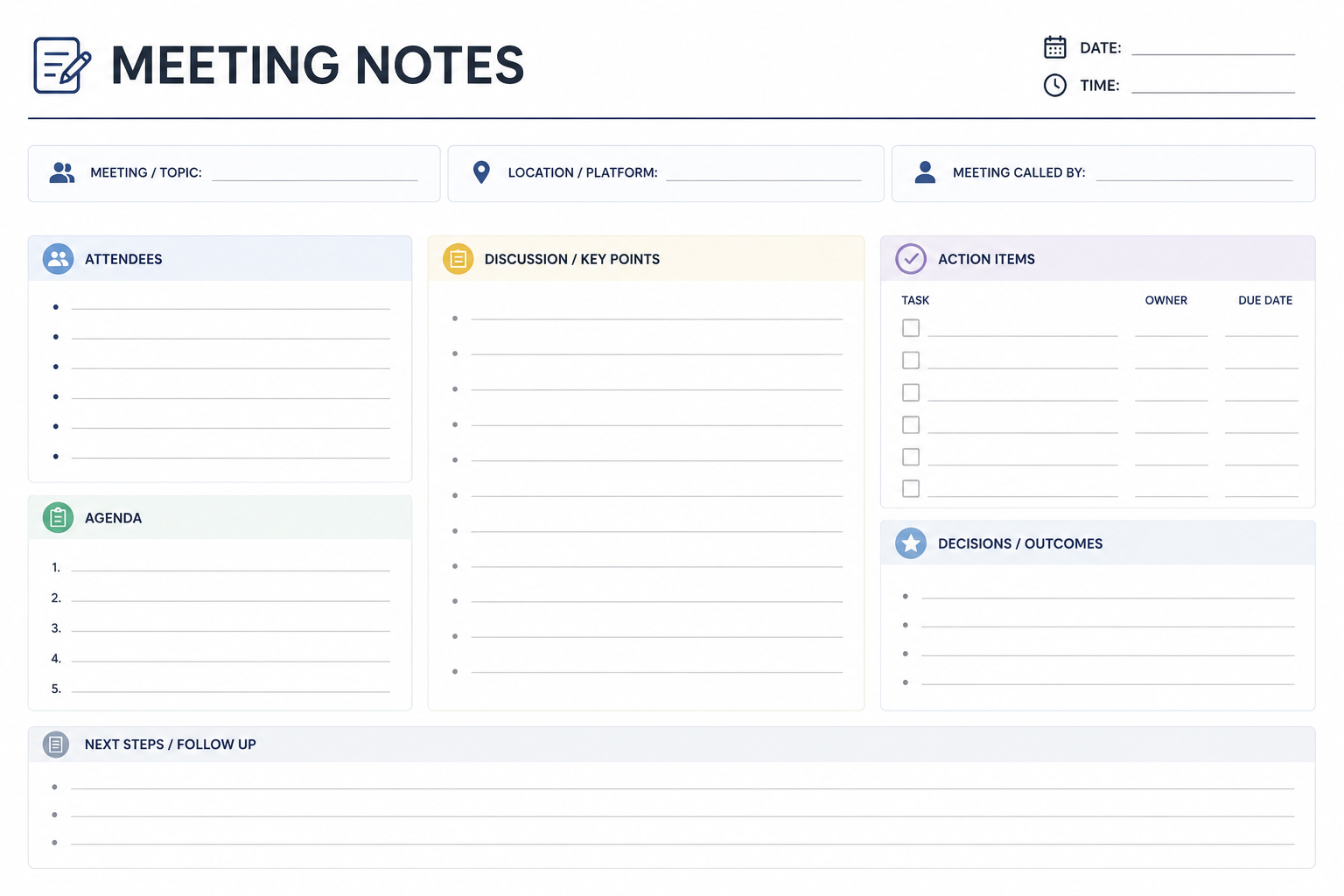
Whether you're leading a team meeting, meeting with clients, conducting interviews, or managing projects, keeping organized notes ensures nothing important slips through the cracks. A well-designed meeting notes template helps you capture key discussions, decisions, action items, and deadlines in one place, making follow-ups easier and improving team accountability.
Instead of starting from scratch every time, using a structured template saves time and creates consistency across meetings. In this guide, you'll learn what a meeting notes template is, how to use one effectively, explore ready-to-use templates for different meeting types, compare meeting notes with meeting minutes, and discover best practices that help you document meetings like a professional.
What Is a Meeting Notes Template?
A meeting notes template is a pre-formatted document used to record the most important details discussed during a meeting. It provides sections for attendees, agenda items, discussion points, decisions, action items, deadlines, and follow-up tasks.
Unlike random handwritten notes, templates keep information organized and make it easier to review discussions later.
Benefits of Using a Meeting Notes Template
Keeps meetings organized
Saves time during documentation
Improves communication among team members
Creates accountability through assigned action items
Makes follow-ups easier
Provides a consistent record of meetings
Reduces the risk of forgetting important decisions
Whether you're searching for a Free meeting notes template blog or a Meeting notes template blog free download, the goal is the same: simplify meeting documentation while improving productivity.
Meeting Notes vs. Meeting Minutes
Although many people use these terms interchangeably, they serve different purposes.
Meeting notes focus on the essential takeaways, while meeting minutes are formal records often required for official or legal purposes.
What Should Every Meeting Notes Template Include?
A complete template should include the following sections:
Meeting Information
Meeting title
Date
Time
Location
Organizer
Attendees
List everyone present along with absent members if necessary.
Meeting Agenda
Outline the topics planned for discussion.
Discussion Points
Summarize important conversations instead of recording every word.
Decisions Made
Highlight approved ideas, strategies, or agreements.
Action Items
Assign responsibilities with deadlines.
Next Meeting
Record the date and objectives for the next session.
Universal Meeting Notes Template
You can use this simple format for almost any meeting.
Meeting Title:
Date:
Time:
Location:
Facilitator:
Attendees:
Agenda
Topic 1
Topic 2
Topic 3
Discussion Summary
Main discussion points
Questions raised
Important feedback
Decisions
Decision 1
Decision 2
Action Items
Next Meeting
Date:
Time:
Objectives:
This Simple meeting notes template blog format works well for most teams and organizations.
Ready-to-Use Meeting Notes Templates
Team Meeting Template
Ideal for weekly team updates.
Include:
Team goals
Progress updates
Challenges
Upcoming priorities
Action items
Client Meeting Template
Useful for agencies, consultants, and freelancers.
Include:
Client objectives
Requirements
Feedback
Deliverables
Deadlines
Next steps
Project Meeting Template
Perfect for project managers.
Sections include:
Project status
Milestones
Risks
Budget updates
Responsibilities
One-on-One Meeting Template
Useful for employee check-ins.
Include:
Employee updates
Performance feedback
Career goals
Challenges
Development plan
Sales Meeting Template
Track:
Sales performance
Pipeline updates
Customer concerns
Revenue targets
Follow-up actions
Brainstorming Meeting Template
Record:
Ideas generated
Voting results
Selected concepts
Implementation steps
Interview Meeting Template
Include:
Candidate details
Skills assessment
Strengths
Concerns
Hiring recommendation
Completed Meeting Notes Example
Project Kickoff Meeting
Date: July 15
Attendees:
Project Manager, Designer, Developer, Marketing Lead
Agenda
Project scope
Timeline
Responsibilities
Discussion
The team reviewed project objectives and agreed on a six-week timeline. Marketing requested weekly progress reports, while development confirmed resource availability.
Decisions
Launch scheduled for August 30.
Weekly meetings every Monday.
Action Items
Best Formats for Meeting Notes
Different teams prefer different platforms.
Microsoft Word
Best for printable documents and formal records. If you need a Meeting minutes template Word, Word provides excellent formatting options.
Google Docs
Ideal for real-time collaboration and remote teams.
Excel
Useful when tracking multiple action items and deadlines.
Notion
Perfect for modern digital workspaces and project management.
OneNote
Excellent for organizing notebooks and meeting histories.
If you need a Meeting notes template blog PDF, exporting your notes as PDF creates a secure and shareable document.
How to Take Effective Meeting Notes
Following a structured process improves both speed and accuracy.
Prepare Before the Meeting
Review the agenda and open your preferred template before participants arrive.
Focus on Key Information
Avoid writing every sentence. Capture decisions, tasks, and important discussions instead.
Record Action Items Clearly
Each task should include:
Responsible person
Deadline
Expected outcome
Review Before Sharing
Correct spelling, verify names, and confirm deadlines before distributing the notes.
Best Practices for Writing Better Meeting Notes
Use short bullet points.
Write objectively.
Record only meaningful discussions.
Highlight decisions.
Include deadlines.
Organize notes with headings.
Share notes within 24 hours.
Maintain consistent formatting.
These habits improve readability and reduce misunderstandings.
Common Mistakes to Avoid
Many professionals make avoidable mistakes when documenting meetings.
Common issues include:
Writing too much detail
Missing action items
Forgetting deadlines
Omitting attendee names
Waiting too long before sharing notes
Mixing opinions with facts
Using inconsistent formatting
Avoiding these mistakes keeps documentation accurate and useful.
AI Meeting Notes vs Manual Meeting Notes
Modern AI tools can automate note-taking, but manual notes still have advantages.
Many organizations combine both methods by using AI for transcription and manually reviewing the final notes.
Best AI Tools for Meeting Notes
Several AI-powered tools simplify documentation.
Choose a solution that integrates with your existing workflow.
Meeting Preparation Checklist
Before every meeting:
Review the agenda
Gather supporting documents
Confirm attendees
Open your meeting notes template
Prepare questions
Test audio and video equipment
Preparation leads to more productive meetings.
Post-Meeting Checklist
After the meeting:
Review notes
Verify decisions
Assign responsibilities
Share documentation
Schedule follow-up meetings
Archive completed notes
Following this checklist ensures everyone stays aligned.
Where Can Meeting Notes Templates Be Used?
Meeting note templates are useful across industries.
Business Teams
Track weekly goals, updates, and project progress.
Project Management
Document milestones, risks, and deliverables.
Sales Teams
Capture customer discussions and follow-up opportunities.
Human Resources
Record interviews, performance reviews, and onboarding meetings.
Educational Institutions
Document faculty meetings and academic planning sessions.
Nonprofit Organizations
Keep committee and board meetings organized.
No matter the industry, structured notes improve communication and accountability.
How Secretaries Can Write Effective Meeting Minutes
Many professionals search for How to write minutes in a meeting as a secretary because formal documentation requires a structured approach.
A secretary should:
Record the meeting title, date, and attendees.
Document agenda items in order.
Summarize discussions objectively.
Record every official decision.
List action items with responsible persons.
Include the time the meeting adjourned.
Review the document for accuracy before distribution.
For formal organizations, using a Simple minutes of meeting sample helps maintain consistency. If official documentation is required, keeping a Sample of minutes of meeting PDF on hand can also serve as a useful reference.
Conclusion
A well-designed meeting notes template transforms scattered discussions into clear, actionable records. Whether you're managing projects, meeting clients, conducting interviews, or running weekly team meetings, using a structured template improves organization, accountability, and communication.
Start with a universal template, customize it for your meeting type, and follow best practices to ensure every discussion leads to meaningful action. Consistent note-taking not only saves time but also helps teams stay aligned and productive.
Frequently Asked Questions
What is a meeting notes template?
A meeting notes template is a structured document used to record agendas, discussions, decisions, and action items during meetings.
What is the difference between meeting notes and meeting minutes?
Meeting notes are informal summaries, while meeting minutes are official records used for formal meetings and legal documentation.
Which format is best for meeting notes?
Google Docs is ideal for collaboration, Microsoft Word works well for formal documents, Notion is great for project management, and PDF is best for sharing finalized notes.
Can AI automatically create meeting notes?
Yes. AI tools such as Microsoft Copilot, Otter.ai, Fireflies.ai, and Fathom can transcribe conversations and generate summaries, though manual review is recommended for accuracy.
What should be included in meeting notes?
Every meeting note should include attendees, agenda, discussion points, decisions, action items, deadlines, and follow-up plans.
How soon should meeting notes be shared?
It's best to distribute meeting notes within 24 hours while discussions are still fresh in everyone's mind.
Are meeting notes templates suitable for remote teams?
Yes. Digital templates in Google Docs, Notion, and other collaboration platforms work especially well for remote and hybrid teams.
Leave a Reply