

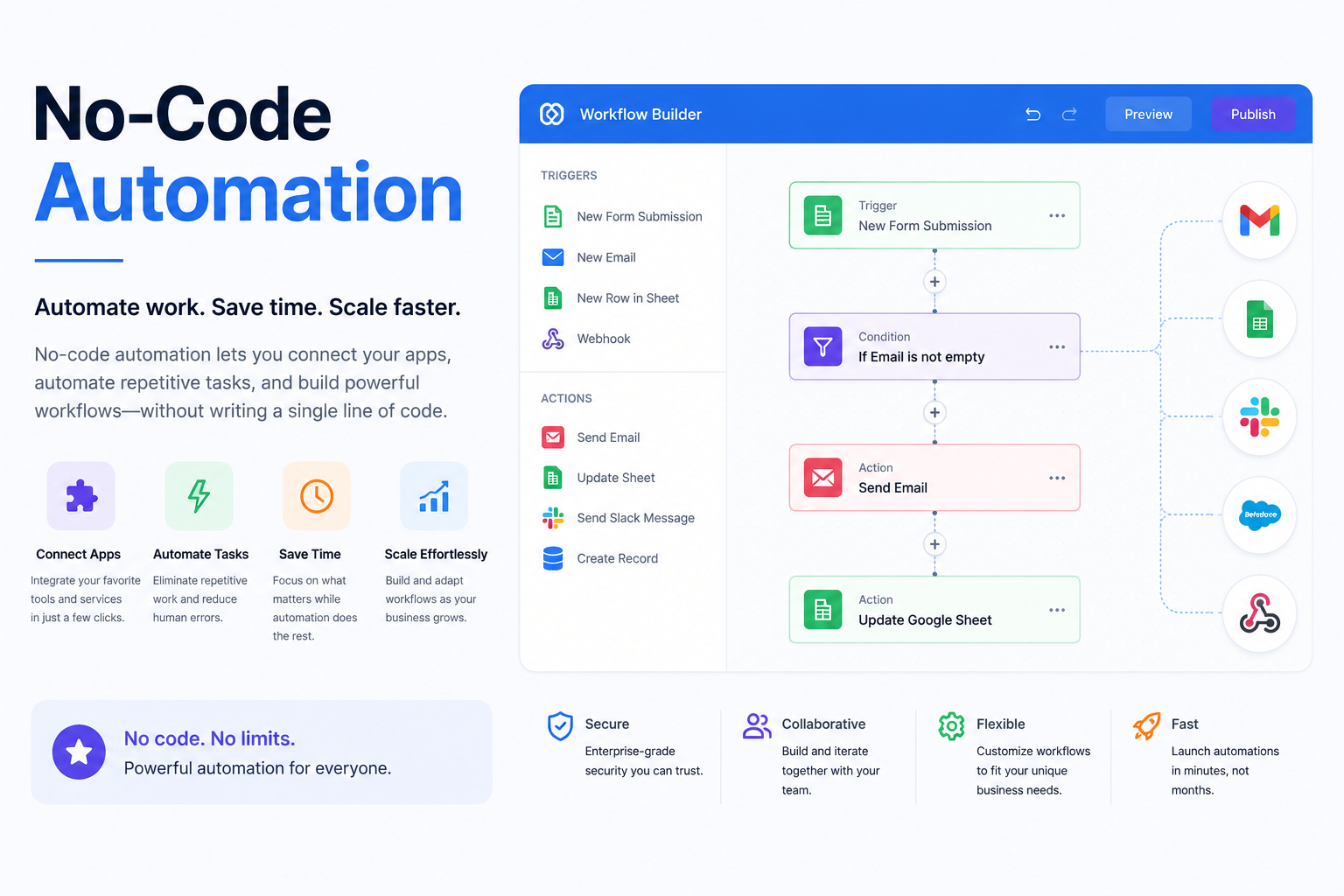
Businesses are under constant pressure to do more with fewer resources. Repetitive tasks, manual data entry, and disconnected apps can slow productivity and increase the risk of human error. This is where no-code automation is changing the way organizations work. Instead of relying on developers to build custom software, anyone can create automated workflows using visual, drag-and-drop interfaces.
Whether you're a small business owner, marketer, HR manager, freelancer, or enterprise team leader, no-code automation empowers you to streamline everyday processes without writing a single line of code. From automatically saving email attachments to notifying your sales team about new leads, automation saves time and allows employees to focus on higher-value work.
In this guide, you'll learn what no-code automation is, how it works, its benefits, practical examples, the best no-code automation tools, and how to choose the right platform for your needs. We'll also explore AI-powered automation, career opportunities, and future trends.
What Is No-Code Automation?
No-code automation is the process of creating automated workflows using visual builders instead of programming languages. Users connect applications, define triggers and actions, and let the software handle repetitive tasks automatically.
Unlike traditional software development, no-code platforms use intuitive interfaces that allow non-technical users to build workflows quickly. This approach enables "citizen developers"—employees without coding experience—to automate everyday business operations.
For example, you can create a workflow that automatically saves Gmail attachments to Google Drive, sends Slack notifications for new website leads, creates CRM contacts from online forms, posts scheduled content across social media platforms, or generates invoices after completed orders.
Why No-Code Automation Matters in 2026
Digital transformation continues to accelerate, and businesses are increasingly adopting automation to stay competitive. Companies now expect faster workflows, better collaboration, and greater efficiency across departments.
Several factors make no-code automation more valuable than ever:
• Growing adoption of AI-powered business tools
• Increasing demand for remote and hybrid work solutions
• Rising operational costs requiring smarter workflows
• Shortage of software developers
• Greater need for business agility
Organizations no longer automate only complex enterprise processes. Today, even small businesses use automation for customer support, sales, marketing, accounting, and project management.
No-Code vs Low-Code vs Traditional Development
If your objective is automating repetitive business tasks, no-code solutions are usually the fastest and most cost-effective option.
How No-Code Automation Works
Every automation follows a simple sequence.
Step 1: Choose a Trigger
A trigger starts the workflow.
Examples include:
• New email received
• Form submission
• File uploaded
• New customer order
• Calendar event created
Step 2: Define an Action
Once the trigger occurs, the automation performs one or more actions.
Examples include:
• Send an email
• Update a spreadsheet
• Create a CRM contact
• Notify a team in Slack
• Generate a PDF
Step 3: Add Conditions
Conditions allow workflows to make decisions.
For example:
"If an order value exceeds $500, notify the sales manager."
Step 4: Test the Workflow
Testing ensures the automation performs correctly before deployment.
Step 5: Publish and Monitor
After activation, the workflow runs automatically whenever the trigger occurs.
Benefits of No-Code Automation
Businesses of every size benefit from workflow automation.
Saves Valuable Time
Employees spend less time performing repetitive manual tasks and more time on strategic work.
Reduces Human Errors
Automated workflows minimize mistakes caused by manual data entry.
Improves Productivity
Teams complete work faster without increasing staffing levels.
Reduces Costs
Automation decreases operational expenses by reducing repetitive labor.
Faster Business Processes
Tasks that once required hours can now finish within seconds.
Better Collaboration
Automated notifications ensure teams stay informed without constant follow-ups.
Easy Scalability
As your business grows, automation workflows can easily expand without hiring additional staff.
No Code Automation Examples
One of the biggest advantages of no-code platforms is their versatility. Here are some practical no code automation examples across different industries.
Marketing
• Automatically publish blog content to social media
• Send welcome email sequences
• Score marketing leads
• Update CRM records
Sales
• Route leads to sales representatives
• Generate proposals
• Schedule follow-up reminders
• Update customer pipelines
Human Resources
• Employee onboarding
• Interview scheduling
• Leave request approvals
• Training reminders
Customer Support
• Auto-assign support tickets
• Send satisfaction surveys
• Create knowledge base articles
• Escalate urgent issues
Finance
• Invoice generation
• Expense approvals
• Payment reminders
• Monthly reporting
E-commerce
• Order confirmations
• Inventory updates
• Shipping notifications
• Customer review requests
Best No-Code Automation Tools
Many businesses begin with No-code automation Zapier because of its user-friendly interface and extensive integration library. Those seeking greater flexibility often prefer No-code automation tools open-source like n8n, which supports self-hosting and extensive customization.
AI and No-Code Automation
Artificial intelligence has transformed modern automation.
Instead of simply moving information between apps, AI-powered workflows can now summarize documents, generate marketing content, analyze customer feedback, categorize support tickets, extract information from PDFs, create personalized responses, and make intelligent decisions.
For example, a customer inquiry can automatically enter your CRM, be analyzed by AI, receive a personalized response, be assigned to the correct department, and generate an internal task.
This combination of AI and no-code automation significantly improves workflow efficiency.
How to Choose the Right No-Code Automation Platform
Before selecting a platform, consider the following factors.
Ease of Use
Can non-technical employees build workflows independently?
Available Integrations
Does the platform connect with your existing software?
AI Capabilities
Does it support AI-powered workflows?
Pricing
Compare subscription costs with expected productivity gains.
Security
Look for encryption, access controls, and audit logs.
Scalability
Choose software that can grow with your business.
Customer Support
Reliable documentation and responsive support reduce implementation challenges.
Learning No-Code Automation
The demand for automation professionals continues to grow, making this an excellent time to develop new skills.
A structured No-code automation course teaches workflow design, integrations, AI automation, and business process optimization. Beginners can also follow a No code automation tutorial to create their first workflows step by step.
Professionals who want to validate their expertise can earn a No code automation certification, demonstrating practical automation skills to employers and clients.
No-Code Automation Jobs
Automation skills are becoming valuable across almost every industry. Companies increasingly hire professionals who can streamline business processes without building custom software.
Popular No-code automation jobs include:
• Automation Specialist
• Workflow Consultant
• Business Process Analyst
• Operations Manager
• Marketing Automation Specialist
• CRM Administrator
• Digital Transformation Consultant
• Customer Success Operations Manager
Freelancers also use automation expertise to help clients improve efficiency, integrate software, and reduce operating costs.
Common Mistakes Beginners Make
Avoid these common mistakes when building your first workflows.
• Automating inefficient processes
• Creating overly complicated workflows
• Skipping testing
• Ignoring workflow monitoring
• Failing to document processes
• Giving excessive permissions
• Forgetting error handling
Starting with one simple workflow before expanding is usually the best approach.
Security Best Practices
Automation often handles sensitive business information.
Follow these recommendations:
• Use multi-factor authentication
• Limit user permissions
• Encrypt sensitive data
• Review workflow access regularly
• Enable audit logs
• Update integrations frequently
• Follow privacy regulations
Strong governance ensures automation improves efficiency without increasing security risks.
Future Trends in No-Code Automation
The future of automation is increasingly intelligent.
Emerging trends include:
• AI-powered workflow assistants
• Natural language workflow creation
• Autonomous AI agents
• Predictive automation
• Hyperautomation
• Intelligent document processing
• Voice-controlled workflows
• Cross-platform orchestration
These innovations will make automation easier, smarter, and more accessible for businesses of every size.
Frequently Asked Questions
What is no-code automation?
No-code automation allows users to build automated workflows using visual tools instead of writing code, making automation accessible to non-technical users.
What are the best no-code automation tools?
Popular options include Zapier, Make, Microsoft Power Automate, Gumloop, Airtable Automations, n8n, and UiPath Studio Web.
Can beginners learn no-code automation?
Yes. Most platforms provide templates, tutorials, and drag-and-drop builders that make learning straightforward.
Are open-source no-code automation tools worth using?
Yes. Open-source platforms like n8n offer flexibility, self-hosting, customization, and reduced long-term costs.
Is no-code automation secure?
Yes, when businesses implement strong authentication, role-based access, encryption, and regular security reviews.
Can no-code automation replace developers?
No. It complements developers by allowing business users to automate routine workflows while developers focus on complex software projects.
Conclusion
No-code automation has become one of the most practical ways for businesses to improve productivity, reduce costs, and simplify repetitive work. With intuitive drag-and-drop interfaces, AI-powered capabilities, and thousands of integrations, organizations of every size can automate daily operations without hiring dedicated developers.
Whether you're exploring no-code automation tools, looking for a no-code automation course, pursuing a no code automation certification, or searching for no-code automation jobs, now is the ideal time to build automation skills. Start with one simple workflow, measure the results, and gradually expand your automation strategy to unlock greater efficiency and long-term business growth.
Leave a Reply